
Settings and Files
The Settings window
Cmd/Ctrl+, opens Settings. Changes apply right away.
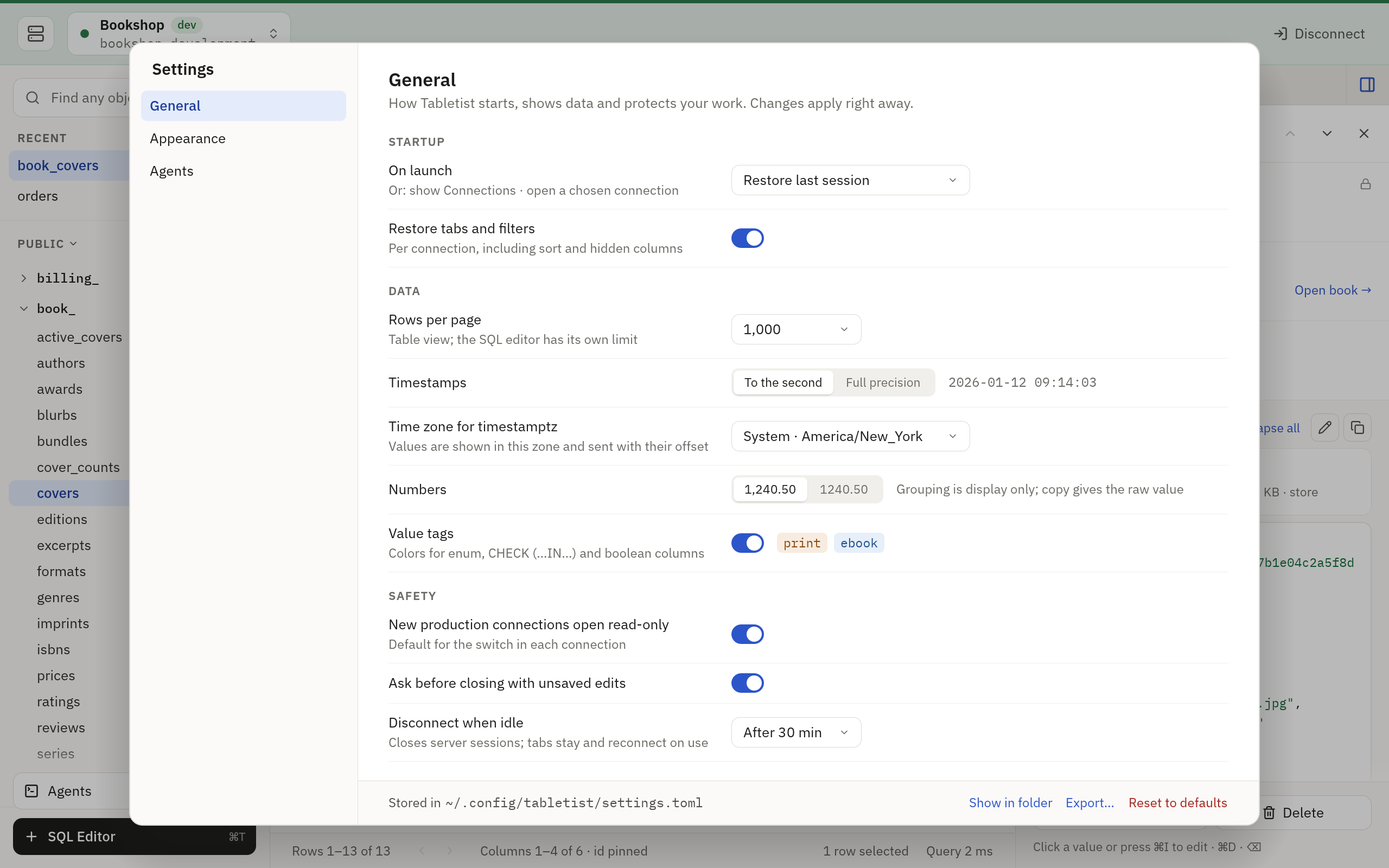
| Option | Choices | Default |
|---|---|---|
| On launch | Restore last session, Show Connections, or a saved connection, each listed with its server and database. Restore opens again the connection windows open when Tabletist last quit, in their order, each connecting and asking for what it needs; with nothing kept, it shows Connections. If the chosen connection was deleted outside Tabletist, Tabletist shows Connections, says so once, and sets this back to Show Connections; deleting it in Tabletist sets it back at once. --demo starts as it always does |
Restore last session |
| Restore tabs and filters | On or off. On, a connection that opens, at launch or from Connections, opens again the table and view tabs its window had when it last closed on that database (or SQLite file), each with its sort and filters; the one in front loads, and each other when you first show it. SQL editors are not opened again. Off, a connection opens with its tables in the sidebar and no tab | On |
| Rows per page | 100, 500, 1,000, 5,000 or 10,000. A table takes a new size when it next loads, not while you page through it | 1,000 |
| Timestamps | To the second, or full precision | To the second |
| Time zone for timestamptz | System, UTC or any zone. A PostgreSQL timestamptz is shown in this zone, a copy gives the value as the server sent it, and a value you type without an offset is sent with this zone’s. In the Omarchy look h/l choose System, UTC or the last zone the file named; any other zone is set in the file |
System |
| Numbers | 1,240.50 or 1240.50. Grouping is for display only: a copy gives the raw value |
1,240.50 on macOS and Windows, 1240.50 in the Omarchy look |
| Value tags | Colors for enum, CHECK and boolean columns | On |
| New production connections open read-only | On or off: where the Open read-only box of a new production connection starts. A connection you saved keeps its own box | On |
| Ask before closing with unsaved edits | On or off. Off, closing a table, its connection or the window, or loading another page of it, discards its pending changes without asking | On |
| Disconnect when idle | Never, or after 5, 15 or 30 minutes, 1 hour or 4 hours unused. The server session is closed; the tabs stay, and the connection connects again when something next needs it: a refresh, a page, a table opened, a run or a save | After 30 min |
A second pane, Appearance, sets the theme, the text, and how the grids and the connection bar are drawn. Each change shows in every open window at once, and in the preview under the options: two rows of a table under the bar of a dev connection, drawn as the grid and the bar are. Its rows are made in the app, so it needs no connection and reads no database.
| Option | Choices | Default |
|---|---|---|
| Theme (macOS and Windows) | System, Light or Dark. System follows the system’s light or dark as it changes, Auto on macOS too | System |
| Theme (Omarchy) | Follow Omarchy, or pin the theme it shows now, which then stays when Omarchy switches. The row says the theme drawn, and under it the palette it gave | Follow Omarchy |
| Interface size (macOS and Windows) | Small, Default or Large: the sidebar, tabs, buttons and the inspector’s labels, from a body text of 12, 13 or 14 points | Default |
| Data font (macOS and Windows) | The face of grid cells, the SQL editor and JSON on macOS, IBM Plex Mono or JetBrains Mono, or an installed monospace font, listed after them (Windows draws its data in Inter, and offers none), and its size, 11 to 16 points by halves | IBM Plex Mono, 12.5 pt |
| Font (Omarchy) | The system’s monospace, as fontconfig resolves it, or a font you name in the file by its fontconfig name. The row says the font drawn; one fontconfig does not have is drawn as the system’s monospace, and the row says so | System monospace |
| Size (Omarchy) | 9 to 24 points: everything in the window, which is drawn larger or smaller as a terminal’s text is | 13 |
| Row density (Omarchy: row height) | Compact, Regular or Roomy. On macOS and Windows a step of 8 points either side of Regular, and taller where a large data size needs it; in the Omarchy look one, one and a half or two lines. The grid keeps the row at its top | Regular |
| Alternate row shading (Omarchy: alternate rows) | On or off, in the table grid and the SQL editor’s results | Off on macOS and Windows, on in the Omarchy look |
| Show column types (Omarchy: column types) | On or off: the second line of the grid’s header | On |
| Table list | Grouped by prefix (Omarchy: tree) or Flat. The default for a connection whose list you have not switched; the sidebar’s switch (Omarchy: t) sets the connection’s own |
Grouped by prefix |
| Window header (Omarchy: connection bar) | Tint + stripe (Omarchy: tint + label), or Stripe only (Omarchy: label only). Production keeps its tint either way | Tint + stripe |
A third pane, Editor, sets how the SQL editor runs and types. Every open SQL editor follows each change at once.
| Option | Choices | Default |
|---|---|---|
| New tabs run in | Read-only transaction, or Follow connection. Read-only: a new SQL editor opens in Read-only on every connection, and its switch can still set it to Read-write. Follow connection: it opens in Read-write on a writable connection that is not production, as the SQL Editor guide says. A connection that opens read-only keeps every editor read-only either way. A change is for the tabs opened after it | Read-only transaction |
| Row limit | 100, 500, 1,000, 5,000 or 10,000 rows for each statement, or No limit. The rows past the limit are not fetched; nothing is added to your SQL. Show all under a cut result fetches the rest | 1,000 |
| Timeout | 5, 15 or 30 seconds, 1 or 5 minutes, or Off. A run still going then is cancelled and rolled back; Cancel works either way. Run without timeout runs a stopped run again with none | 30 s |
| ⌘↩ runs (Omarchy: ctrl+enter runs) | Statement at cursor, or Whole tab: every statement in order, stopping at the first error. A selection always runs what it selects, whichever is set | Statement at cursor |
| Autocomplete | As you type, On Ctrl+Space (the list opens only when you ask), or Off | As you type |
| Line numbers | On or off on macOS and Windows; relative, absolute or off in the Omarchy look. On writes absolute; a relative set in the file shows as on and stays |
On (absolute) on macOS and Windows, relative in the Omarchy look |
| Current line highlight (macOS and Windows) | On or off: the line the cursor is on is filled while the editor has the keyboard. The Omarchy look has no row: it follows the key, set in the file | On |
| Keep query history (Omarchy: keep) | The last 100, 1,000 or 10,000 statements of each connection, on this computer, or Don’t keep: every statement run from the SQL editor, a grid’s save, a filter or sort you set, and agents’ runs, as the History tab shows them. Results are never kept. Don’t keep records nothing more, and asks whether to delete what is kept (Omarchy: D deletes, n keeps). Show History beside it (Omarchy: Enter) shows the window’s History tab |
Last 1,000 |
The other keys of the four [editor.…] tables are read and kept now, and
take effect in a later version.
On macOS and Windows the Editor pane’s Clear history… deletes the history of every connection, once you say so; a History tab’s own clears its connection’s alone.
A fourth pane, Agents, sets what the [mcp] keys
hold, and shows how to connect an agent:
Agents is the guide.
| Option | Choices | Default |
|---|---|---|
| Let agents use Tabletist | On or off. Off ends every agent’s session | Off |
| Keep the activity log | 7, 30, 90 or 365 days | 30 days |
| Notify when an agent connects | On or off | On |
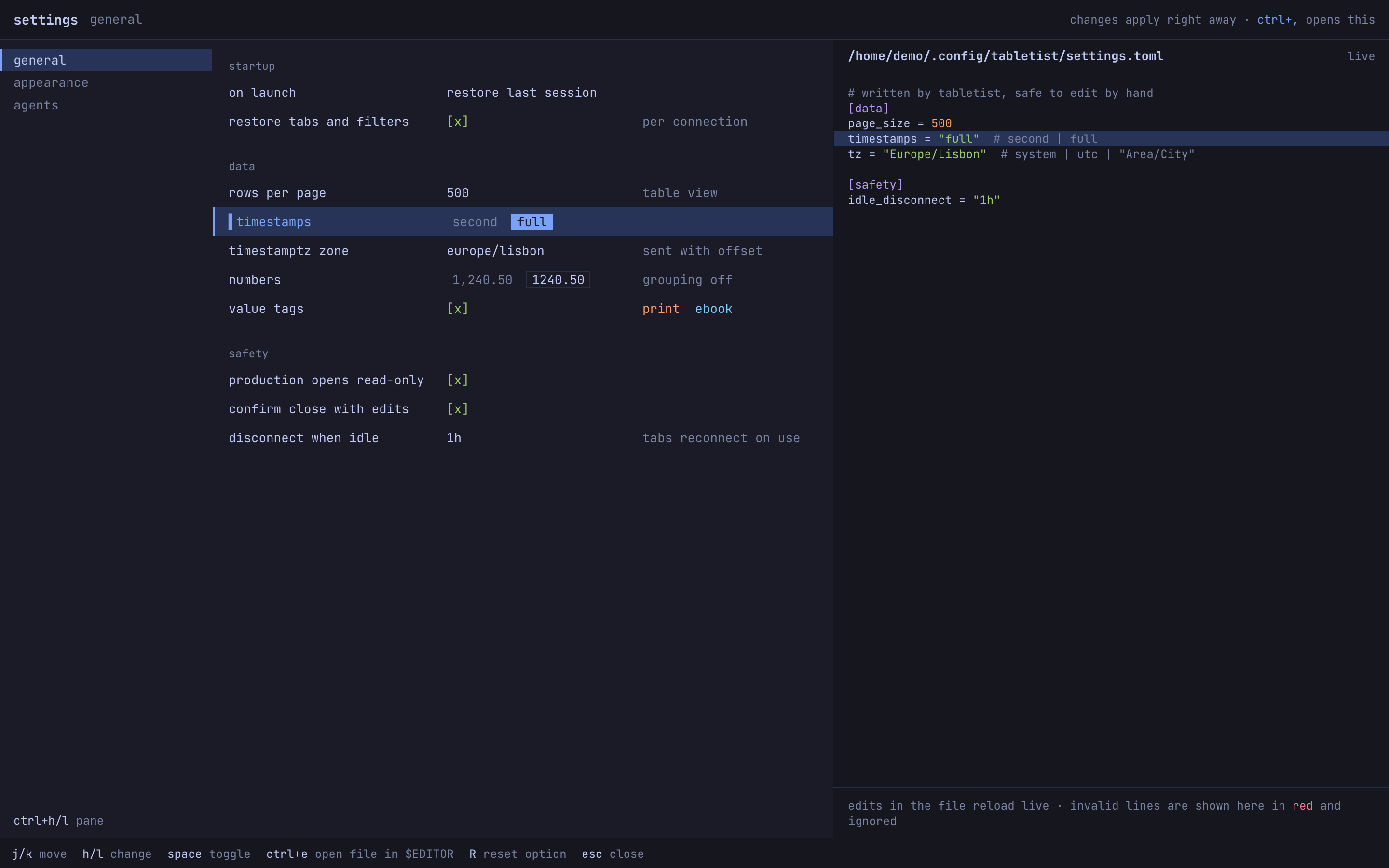
On macOS and Windows the window shows where the settings file is, and can
reveal it in your file manager, export it, or reset the options of the
pane it shows (on the Editor pane, every key of the [editor.…] tables). On the Agents pane, a reset leaves the server’s switch as
it is. In the Omarchy look the file is shown beside the options.
The settings file
Settings are kept in settings.toml, which is safe to edit by hand.
Tabletist watches the file and applies your edits while it runs. The file
holds only what differs from the defaults. Until you change an option
there is no file, and one the app writes starts with a header line. Here
is every key at its default (group_digits, theme, font, font_size,
zebra, keys, line_numbers and keywords have none of their own:
they follow the look):
[startup]
on_launch = "restore"
restore_tabs = true

[data]
page_size = 1000
timestamps = "second"
tz = "system"
value_tags = true

[safety]
production_read_only = true
confirm_close_edits = true
idle_disconnect = "30m"

[sidebar]
show_system_schemas = false

[editor.run]
new_tab = "read-only"
limit = 1000
timeout = "30s"
run = "statement"
confirm_unsafe_writes = true

[editor.typing]
indent = 2
autocomplete = "typing"
close_pairs = true
highlight_line = true
wrap = false

[editor.format]
commas = "trailing"

[editor.history]
keep = 1000

[mcp]
enabled = false
log_days = 30
notify = true

[appearance]
interface_size = "default"

[appearance.grid]
row_height = "regular"
column_types = true
table_list = "tree"

[appearance.env]
bar = "tint"
| Key | Values | Default |
|---|---|---|
startup.on_launch |
"restore", "connections" or "conn:<id>", a saved connection’s id from connections.toml. Tabletist writes the connection’s name in a comment beside it, on_launch = "conn:6a0c…" # Bookshop, and replaces whatever comment is beside it each time it sets the key, and again when that connection is renamed |
"restore" |
startup.restore_tabs |
true or false. Whether a connection opens again the table tabs, sorts and filters its window last had, kept in session.json. The row panel comes back as the window last left it either way |
true |
data.page_size |
10 to 10000. A table takes a new size when it next loads (opened, refreshed, sorted, filtered or reconnected), not while you page through it | 1000 |
data.timestamps |
"second" or "full" |
"second" |
data.tz |
"system", "utc" or a zone such as "America/New_York". A name the zone database does not know is a line that cannot be read. A PostgreSQL timestamptz value is shown and edited in this zone, a copy gives it as the server sent it, and one you type without an offset is sent with this zone’s |
"system" |
data.group_digits |
true or false |
Not set: grouped on macOS and Windows, not in the Omarchy look |
data.value_tags |
true or false |
true |
safety.production_read_only |
true or false. Where the Open read-only box of a new production connection starts; the connection is saved with its box set, so a change here changes no saved connection |
true |
safety.confirm_close_edits |
true asks before pending changes are dropped; false discards them without asking. While a save runs, what would drop them does nothing until it ends, and closing the window asks either way |
true |
safety.idle_disconnect |
"never", "5m", "15m", "30m", "1h" or "4h". A connection left unused that long has its server session closed; its tabs stay as they were, and it connects again when you next refresh, page, open a table, run or save. Never while changes are pending or something is still loading, running or saving |
"30m" |
sidebar.show_system_schemas |
true shows schemas such as pg_catalog and information_schema |
false |
editor.run.new_tab |
"read-only" or "connection" |
"read-only" |
editor.run.limit |
1 to 10000 rows for each statement, or 0 for no limit |
1000 |
editor.run.timeout |
"1s" … "3600s" or "1m" … "60m", or "off". A longer one is a line that cannot be read |
"30s" |
editor.run.run |
"statement" or "all": what Cmd/Ctrl+Return runs |
"statement" |
editor.run.confirm_unsafe_writes |
true or false. Read and kept; not acted on yet |
true |
editor.typing.keys |
"standard" or "vim". Read and kept; not acted on yet |
Not set: standard on macOS and Windows, vim in the Omarchy look |
editor.typing.indent |
2, 4 or "tab". Read and kept; not acted on yet |
2 |
editor.typing.autocomplete |
"typing", "manual" or "off" |
"typing" |
editor.typing.close_pairs |
true or false. Read and kept; not acted on yet |
true |
editor.typing.line_numbers |
"absolute", "relative" or "off" |
Not set: absolute on macOS and Windows, relative in the Omarchy look |
editor.typing.highlight_line |
true or false |
true |
editor.typing.wrap |
true or false. Read and kept; not acted on yet |
false |
editor.format.keywords |
"upper", "lower" or "keep". Read and kept; not acted on yet |
Not set: upper on macOS and Windows, lower in the Omarchy look |
editor.format.commas |
"trailing" or "leading". Read and kept; not acted on yet |
"trailing" |
editor.history.keep |
0 to 100000 statements kept for each connection, from every source; 0 keeps none. A smaller number deletes the oldest past it |
1000 |
appearance.interface_size |
"small", "default" or "large", on macOS and Windows |
"default" |
appearance.font |
On macOS the data’s face, "IBM Plex Mono", "JetBrains Mono" or the family name of an installed font ("Menlo"); "monospace" is IBM Plex Mono too, and a name no installed font has is drawn as IBM Plex Mono, which the window says. Windows draws its data in Inter, whatever it says. In the Omarchy look a fontconfig name ("Fira Code"); "monospace" is the system’s. Written once you set it |
Not set: IBM Plex Mono, or the system’s monospace |
appearance.font_size |
Points, whole or by halves (13, 12.5). On macOS and Windows the data’s, 11 to 16; in the Omarchy look all of it, 9 to 24. A size past a look’s range is drawn at its nearest end. Written once you set it |
Not set: 12.5 on macOS and Windows, 13 in the Omarchy look |
appearance.theme |
On macOS and Windows "system", "light" or "dark". In the Omarchy look "omarchy", or a theme to pin: an Omarchy theme’s name ("Tokyo Night"), a palette file in the themes folder ("Nord.json"; its name alone where no Omarchy theme has it), or a path that starts with / or ~/ to a palette file or an Omarchy theme’s folder. A value meant for the other looks is drawn as not set and stays in the file |
Not set: the system’s light or dark, or the Omarchy theme |
appearance.grid.row_height |
"compact", "regular" or "roomy" |
"regular" |
appearance.grid.zebra |
true or false. Written once you set it; without it, the look’s default |
Not set: off on macOS and Windows, on in the Omarchy look |
appearance.grid.column_types |
true or false |
true |
appearance.grid.table_list |
"tree" or "flat": how a connection lists its tables until you switch its own |
"tree" |
appearance.env.bar |
"tint" or "label". Production is tinted either way |
"tint" |
mcp.enabled |
true lets agents reach the connections you open to them, through tabletist mcp |
false |
mcp.log_days |
1 to 3650 days. How long the log of agents’ calls keeps a call | 30 |
mcp.notify |
true tells you when an agent connects: a notification on Linux, the Dock icon bouncing on macOS, the taskbar button flashing on Windows |
true |
show_system_schemas is set only in the file, and so is a pin by a
name or a path other than the Omarchy theme of the moment, and a font by
its fontconfig name. The SQL editor’s Limit and Timeout menus set
editor.run.limit and editor.run.timeout, which every open SQL editor
follows, and the text size keys (Cmd+= Cmd+- Cmd+0 on macOS, Ctrl+=
Ctrl+- Ctrl+0 on Windows, ctrl+= ctrl+- in the Omarchy look) set
font_size, wherever the keyboard is.
A line that cannot be read is ignored and reported in the Settings window,
and its key keeps its last good value: the one it had before the edit, or
its default when Tabletist starts. When you change an option in the app,
only its key is written: set back to its default, the key is taken out of
the file, and otherwise it gets the new value where it is, or goes at the
end of its table. Your comments (but not the one beside startup.on_launch, which is
Tabletist’s), the order of your keys, the lines that
could not be read and keys Tabletist does not know all stay as you wrote
them. The one exception is a table written inline (data = { … }) or
with dotted keys (data.page_size = 500): a key added to it or taken out
of it writes the whole file again, without your comments. Export…
saves a copy of the file as it is.
A file an older version wrote holds every key, at the values it had then,
the defaults of that time too (page_size = 300, group_digits = false).
Those stay until you change them: take a key out of the file, or reset the
tab, to have today’s default. An older file’s editor.sql_limit and
editor.sql_timeout_secs are read while the file has no
editor.run.limit and editor.run.timeout (a timeout over an hour as an
hour), and give way to them the first time you set the limit or the
timeout.
Files
Tabletist keeps settings and state in two folders.
| System | Settings | State |
|---|---|---|
| Linux | ~/.config/tabletist |
~/.local/state/tabletist |
| macOS | ~/Library/Application Support/dev.tabletist.Tabletist |
The same folder |
| Windows | %APPDATA%\tabletist\Tabletist\config |
%LOCALAPPDATA%\tabletist\Tabletist\data |
On Linux, XDG_CONFIG_HOME and XDG_STATE_HOME move the two folders.
An administrator’s policy, managed.toml, is in a third place of its own:
The administrator’s policy.
| File | Folder | Holds |
|---|---|---|
settings.toml |
Settings | The options above |
connections.toml |
Settings | Your saved connections. It never holds a password |
known_hosts.json |
Settings | The SSH host keys you trusted |
themes/ |
Settings | Palette files |
last_used.json |
State | When each saved connection last connected |
table_lists.json |
State | How each saved connection lists its tables, where you switched it in the sidebar |
connections.moved |
State | A note that your connections are kept in connections.toml |
session.json |
State | The connection windows open when Tabletist last quit, and each saved connection’s window as it last had it: its table tabs, with their sort and filters, and whether the row panel was shown. Written at quit, when a connection’s window closes or gets another connection, when a database switch drops its tables, and when a connection is deleted. Not written while connections.toml cannot be read. A connection deleted from connections.toml by hand is taken out of it at the next write |
recents.json |
State | What you opened last on each saved connection, by its id: up to eight tables and views, with the database each is in and when it was opened, for the start screen. Written when something opens, when Clear is pressed, when an object the database no longer lists is dropped, and when a connection is deleted |
labels.json |
State | The column you chose to label each table’s rows in a foreign key’s list, by saved connection and, on PostgreSQL, by database |
tabletist.log, panic.log |
State | Logs |
agents.sqlite3 |
State | Every call agents made: the tool, the statement and its values, and how it ended. Never a row |
history.sqlite3 |
State | The query history, by saved connection: each statement run from the SQL editor, a grid’s save (its whole transaction, with the values you typed written in) and a filter or sort you set, with when, how long, its rows and how it ended, and a filter’s table, filter and sort. An agent’s run is kept as its call’s place in agents.sqlite3, its tool, rows, time and result, never what it sent, its name included: the History tab reads that from agents.sqlite3. Never a result’s rows. Kept to editor.history.keep per connection, and written on its own: a statement never waits for it |
agents_shown.json |
State | What agents may do as Tabletist last showed it: whether the server is on, and each connection’s access, hidden tables and masked columns |
mcp.sock, mcp.key, mcp.lock |
Runtime, else State | Where tabletist mcp reaches the app, the key each proves it holds before either says more, and the lock the app holds while it listens. The socket and the key are there while agents are on |
mcp.pipe |
State | On Windows, in the socket’s place: the name of the pipe tabletist mcp reaches the app by, new each time agents are turned on |
The runtime folder is /run/user/<your user id>/tabletist on Linux, where
the system makes /run/user for you, and ~/.local/state/tabletist where
it does not, whatever XDG_STATE_HOME says: an agent may start
tabletist mcp without your variables. macOS has none, and uses the state
folder, or .tabletist in your home folder when the state folder’s path is
too long for a socket. Windows has none either, and uses the state folder:
the app listens on a named pipe, whose name is new each time agents are
turned on, and writes the name there for tabletist mcp to find.
Passwords are kept in the system keyring, never in these files. Read about passwords.
The connections file
Saved connections are kept in connections.toml, one [[connections]]
table for each.
version = 3

[[connections]]
id          = "6a0c1f0e-5a52-4b7b-9c56-3f0c8f2f7a11"
name        = "Bookshop production"
environment = "production"
read_only   = true
password    = "keyring"
ssh_secret  = "ask"
driver      = "postgres"
host        = "db.example.com"
port        = 5432
user        = "app"
database    = "bookshop_production"
tls         = "verify-full"
ca_file     = "/etc/ssl/bookshop-ca.pem"

[connections.ssh]
host = "bastion.example.com"
port = 2222
user = "deploy"
auth = "key-file"
key  = "/home/ada/.ssh/id_ed25519"

[[connections]]
name        = "Bookshop on disk"
environment = "local"
driver      = "sqlite"
sqlite_path = "/home/ada/bookshop.db"
| Key | Values | Without it |
|---|---|---|
id |
Any text that no other connection has | Tabletist gives the connection one at the next start |
name |
Text | Required |
environment |
local, dev, staging, production, none |
none |
read_only |
true, false |
As the environment has it: read-only on production |
password |
none, keyring, ask |
none |
ssh_secret |
none, keyring, ask |
none |
driver |
postgres, mysql, sqlite |
Required |
host, user, database |
Text | Empty |
port |
A number up to 65535 | 5432 for PostgreSQL, 3306 for MySQL |
tls |
disable, prefer, require, verify-ca, verify-full |
prefer |
ca_file |
The path of a certificate file | None |
sqlite_path |
The path of a SQLite file | None |
A tunnel is the connection’s [connections.ssh] table: host, and
optionally port and user, auth (password, key-file or agent),
and with key-file the key to use.
What agents may do on a connection is its [connections.agents] table:
access (off or read), rows, the most rows of an answer (1 to 5000),
and timeout_secs, how long a statement may run (1 to 60). Without the
table, or a key of it, a connection is off, with 500 rows and 10 seconds.
The table can also say which tables agents may not read, with one of two lists:
[connections.agents]
access = "read"
hidden = ["customers", "sales.orders"]
hidden names the tables agents may not read, and every other one they
may. only names the tables they may read, and no others, the ones made
later included: only = [] hides every table. A name without a schema is
that table in every schema, and a name with a dot or a double quote in it
is written in double quotes, with the quote doubled: sales."q1.orders".
A view over a hidden table is hidden with it, and so are a partition and a
child table of one. While anything is hidden, agents may not read the
system catalogs either (information_schema, pg_catalog, mysql,
sqlite_schema and the rest). If a table that hidden names is renamed
or dropped, agents may not use the connection at all until you take the
name out of the list or put the right one in.
masked names the columns whose values agents get as •••, every value,
an empty one too:
[connections.agents]
access = "read"
masked = ["orders.email", "sales.customers.phone"]
An entry is a table and a column, or a schema, a table and a column, each
part written as in hidden. One without a schema is that column of the
table of that name in every schema. Agents may select a masked column as
it is, and may not filter, join, sort, group or compute on it, nor on any
column of the same name in any table. A view that reads one is refused,
and so is any view over its table on MySQL. Its partitions and child
tables have it masked too, and so does a generated column of its table.
If a column that masked names is renamed or dropped, agents may not use
the connection at all until you take it out of the list or put the right
one in.
A file in which a connection masks a column says version = 6, one in
which a connection hides a table and masks none says version = 5, one
in which a connection has the table and neither hides nor masks says
version = 4, and one in which none has it stays version = 3. Agents
use the table only while
[mcp] enabled is true in settings.toml. Stop agents here, in a
connection’s Agents tab, stops the agents working on it and sets its
access to off, so that an agent that connects again does not see it.
Agent access changed outside Tabletist
A change to either file that lets agents do more than Tabletist last
showed you is not applied at once: turning [mcp] enabled on, a
connection’s access up from off, a connection hiding less (a name
taken out of hidden or put into only, or a hidden list made an
only one), or a connection masking less: a name taken out of masked,
or one that named a column in every schema made to name it in one.
Tabletist says what
changed in a bar under the top of the window, and until you answer,
agents may do what they could before. Keep applies the change. Put
back undoes it in the files: it turns [mcp] enabled off, sets the
connection’s access back to off, or puts its tables or its masked
columns back as they were, and leaves your other settings and connections
as they are. While a name taken out of masked is held, a column put into
it at the same time is masked at once. A change that
lets agents do less applies at once.
Turning agents on in Tabletist itself, with Turn on in a connection’s
Agents tab or the switch in Settings › Agents, is never held. Tabletist keeps what it showed you in
agents_shown.json. Without that file, the first time a version with this
check starts, whatever you turned on by hand is held once.
Edit the file while Tabletist is closed. Tabletist writes the whole file again when you change a connection, so a comment you add is not kept.
Tabletist reads the file strictly. A key it does not know, or a value a key
cannot have, is an error and not something it skips: a line such as
read_onyl = true must not pass for a connection that may write. When the
file cannot be read, Tabletist starts with no connections, says which line
is wrong, and keeps the file beside itself as connections.toml.bad (or
.bad.1 when that name is taken: the notice says which). Fix the line and
rename the file back. When each connection last connected is kept. What
Tabletist says of the line never repeats a value written on it.
Until you rename the file back or remove it, every start says that it is there, and loads no connection.
Versions before this one kept the connections in connections.json.
Tabletist reads that file once, at the first start that finds no
connections.toml, writes the two files above from it, tells you, and
leaves it where it is. If the old file itself cannot be read, it is kept
aside in the same way and nothing is written for it, so it is read again
once it is mended.
At the next start, which finds connections.toml, Tabletist notes in its
state folder that the connections have moved (connections.moved). From
then on connections.json is not read again, whatever becomes of the new
file: the connections of the day they moved do not come back in place of a
connections.toml that was kept aside or removed. To have the old file
read once more, remove connections.moved as well.
The administrator’s policy
An administrator can set limits that nobody else on the computer can
raise, in managed.toml. It is kept where only an administrator can
write, and no variable moves it:
| System | File |
|---|---|
| Linux | /etc/tabletist/managed.toml |
| macOS | /Library/Application Support/Tabletist/managed.toml |
| Windows | Not read yet |
The file is a floor under your own settings. Each of its limits is
combined with yours, and the stricter one is in force. Nothing in
settings.toml or connections.toml can lift it, and nothing of it is
written into them: when a rule is removed, you have your own settings
back. A coding agent runs as you and can edit your files, so this is the
one limit it cannot undo, as long as it cannot act as an administrator.
version = 1

[agents]
allowed = true           # false: agents cannot be turned on
log_days_min = 90        # the log of agents' calls keeps a call at least this long

[[rules]]
name = "Bookshop production"
match = { driver = "postgres", host = "db.example.com", database = "bookshop_*" }
read_only = true
access_max = "read"
rows_max = 500
timeout_max_secs = 10
hidden = ["customers"]
masked = ["orders.email"]

[[rules]]
name = "Analytics replica"
match = { driver = "postgres", host = "replica.example.com" }
visible_only = ["books", "authors", "orders"]

[[rules]]
name = "Shared files"
match = { driver = "sqlite", path = "/srv/shared/*.db" }
access_max = "off"
| Key | Values | Without it |
|---|---|---|
version |
1 |
Required |
agents.allowed |
true, false |
true |
agents.unmatched |
"off": agents are Off on a connection no rule matches. "as_set": such a connection is as you set it |
"off" when the file has a rule, "as_set" when it has none |
agents.log_days_min |
1 to 3650 | No least |
rules[].name |
Text | Required |
rules[].match |
driver, host, port, database, path, each optional, at least one |
Required |
rules[].read_only |
true: your own sessions on the connection are read-only |
As the connection’s box says |
rules[].access_max |
"off", "read" |
No ceiling |
rules[].rows_max |
1 to 5000 | No ceiling |
rules[].timeout_max_secs |
1 to 60 | No ceiling |
rules[].hidden |
Tables agents may not read, named as in connections.toml: customers, or sales.customers |
Nothing hidden |
rules[].visible_only |
The only tables agents may read, named the same way. Not in a rule that has hidden |
Every table |
rules[].masked |
Columns whose values agents get as •••: orders.email, or sales.orders.email |
Nothing masked |
A rule matches a connection by what it reaches. Each key in match must
match, and * in it stands for any run of characters. host is compared
without regard to case, and through an SSH tunnel it is the database’s
host. path is a SQLite file’s, with ~ read as your home folder. A key
the connection has no use for, such as path on PostgreSQL, does not
match. Every rule that matches a connection applies.
A rule’s tables and columns apply beside your own. A table is visible
to agents only if your Tables setting and every matching rule let it be
seen, so two visible_only lists leave the tables both name. A column
is masked if you or any matching rule masks it. A view over a hidden
table is hidden with it, as with your own.
An entry in hidden or masked that names nothing in the database
closes the connection to agents, as yours does: a table that was
renamed is hidden by nothing under its new name. A rule may match
several databases, and each must have what it names. An entry in
visible_only that names nothing hides more, and stops nothing.
When a rule is why an agent is refused, it is told so, with the same
code as for your own settings: “customers is hidden for agents by your
administrator’s policy.”, or, for a stale entry, “Agents may not use
this connection until your administrator’s policy is fixed.”, which
names no entry. list_connections gives each rule’s entries apart from
yours, under administrator, without the rule’s name.
The file is read when Tabletist starts. The connection editor and Settings show your own settings, not the administrator’s limits.
Tabletist reads the file strictly. A key it does not know, a value a key cannot have, or a version other than 1 makes the whole file unreadable, and then, until it is mended, agents are off and every connection is read-only. Tabletist says so under the top of the window, with the line, and never repeats a value written on it. A file that is not there is no policy.
Command-line options
| Option | Does |
|---|---|
--demo |
Runs with sample data in a throwaway profile |
--verbose |
Logs at debug level |
--version |
Prints the version |
--help |
Lists the options |
mcp |
Connects an agent to the running Tabletist, over its stdin and stdout. An agent starts it. When Tabletist is not running, or agents are off in it, it says so to the agent and ends |
--help also lists --demo-shot, which saves a picture of the demo’s
window to a file, and --demo-size, which sets that window’s size.