
What is Tabletist?
Why Tabletist
A fast, native database client. Tabletist connects to PostgreSQL, MySQL, SQLite and BigQuery. It is written in Rust and draws its own window, so there is no browser inside. It runs on Linux (Omarchy and Hyprland first), macOS and Windows.
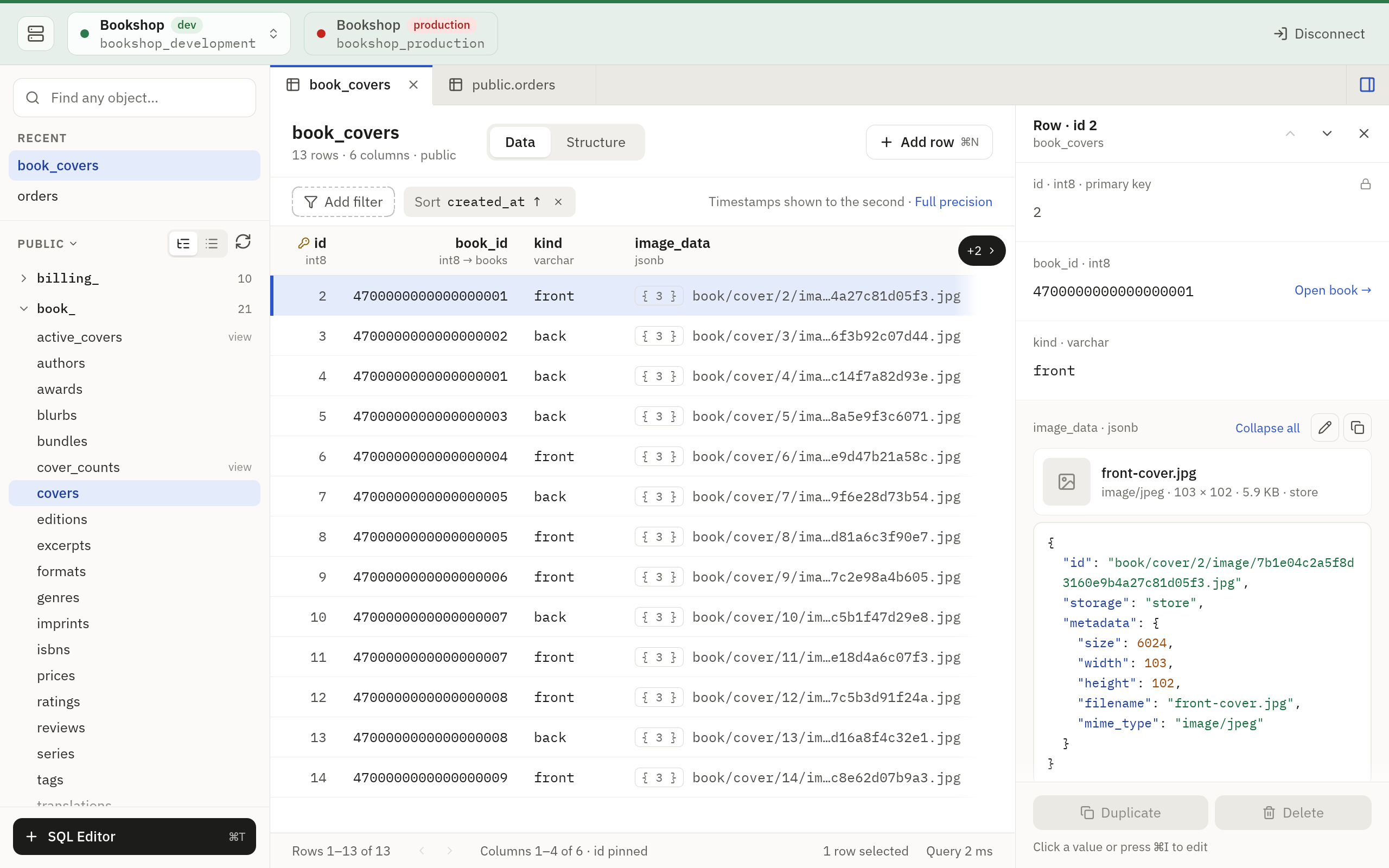
What it does
- Keeps your connections. Saved connections sit in a picker, each tagged with its environment (local, dev, staging, production) and when it was last used. Open more than one and each is a chip in the window’s header.
- Connects the way your servers need. Direct connections, TLS, and SSH tunnels with a password, a key file or your agent. Passwords live in the system keyring, or are asked for when you connect. BigQuery signs in with a service-account key file or Google Cloud’s default credentials. Read about connections.
- Browses tables. A sidebar of one schema’s tables and views, quick open to find any of them by name, a data grid with sorting, filters and paging done by the server, a row panel that shows every field of a row, and Structure and DDL views. Browse a table.
- Edits data safely. Change values, and add, duplicate and delete rows. Dates have a calendar, and a foreign key of one column searches the table it points at as you type. Changes stay pending until you save. A save is one transaction. When someone else changed the same row, the save writes nothing and asks you what to do. See how editing works.
- Runs SQL. An editor per connection with completion, a formatter, Vim keys if you want them, a row limit and a timeout, read-only or read-write, and a History tab of what ran on the connection lately. Open the SQL editor guide.
- Copies and exports. Select cells or rows in a table’s grid or a SQL result, and copy them as CSV, TSV, JSON, Markdown or SQL INSERT. Export a table or a result to a file in those formats or JSON Lines. Exports run in the background, several at once if you like. Copy and export.
- Lets agents read your databases. Claude Code, Cursor and other agents ask Tabletist over MCP. They read only the connections you allow, never get the connection’s password, and are kept from what is in the tables you hide and the values of the columns you mask. You can read a log of their calls. Connect an agent.
- Is careful with production. A production connection opens read-only unless you turn that off, and a save to production asks first, with the statements on screen.
- Looks at home. A macOS look in IBM Plex, and on Linux the Omarchy look: square, keyboard first, with vim keys. Settings › Keyboard changes the keys. Read about the Omarchy look and Tabletist on macOS.
- Keeps itself up to date. It checks GitHub for a new version. On macOS from Applications, and on Linux from the AppImage or the unpacked archive, it installs the new version when you restart; on Windows it links to the release. See the download page.
What it does not do yet
Tabletist is young. These are the limits you are most likely to meet:
- You can change values in existing rows, and add, duplicate and delete rows. Pasting rows is not built yet.
- Binary values, values over 256 KiB, views, and tables without a primary key or unique index cannot be edited.
- Importing a file into a table is not built yet.
- The SQL editor does not run read-write on a production connection.
- A BigQuery connection is read-only: BigQuery has no transactions to edit rows with. It has no DDL view, and agents cannot read it once it hides a table or masks a column.
- SSH tunnels do not go through
ProxyJumporProxyCommand. - The app is in English only.
Open source
Tabletist is free and open source under the MIT license. The code, the issues and the releases are on GitHub.
